Why Claude Code hooks are slow, and how to find which one
On this page
Claude Code hooks are slow because they block by default: Claude waits for each matching hook, up to 600 seconds for command hooks. Find the slow one with claude --debug, then narrow its matcher, add "async": true or move the work to Stop.
A hook that takes two seconds feels free. Put it on every file edit, and a session with 200 edits spends almost seven minutes waiting on it. Claude Code hooks block by default, so that time comes straight out of your session.
This post covers why hooks get slow, how to see which one takes the time, and how to fix it without losing what the hook does.
Why hooks slow Claude Code down
According to the hooks docs, "by default, hooks block Claude's execution until they complete." Claude waits for a PreToolUse hook before the tool runs, and for a PostToolUse hook before it takes the next step.
Three things multiply that wait:
- Broad matchers. A hook on
Edit|Writeor*runs on every match, not once per task. - Subagents.
PostToolUsehooks also run for every tool call a subagent makes. In one report, a test run in a per-edit hook took about six minutes per edit and kept a subagent busy for two hours. - Long default timeouts. A command hook may run up to 600 seconds before Claude Code cancels it. The timeout went from 60 seconds to 10 minutes in v2.1.3, so a stuck hook now waits ten times longer.
Hooks that match the same event run in parallel, so two slow hooks on one event cost about as much as the slower one. Hooks on different events add up.
Common causes of a slow hook
| Cause | What it looks like |
|---|---|
| Formatter or linter on every edit | Ruff, Prettier or ESLint on PostToolUse for every Edit and Write. One user measured about a minute after every edit from a linter plus a type checker. |
| Tests in a hook | A test suite on each edit, the same suite again for every subagent edit |
| Runtime start-up | npx, node or python starting fresh on every event before the script does anything |
| Network calls | A notification or logging hook that waits for an HTTP response |
| A hook waiting on input | A script blocked reading stdin. Open bugs (#90585, #85250) show such hooks can hang past their timeout. |
How to see how long each hook takes
The debug log
claude --debug (or /debug in a running session) writes a log to ~/.claude/debug/<session-id>.txt. It lists each hook that matched, its exit code, its output and any timeout (debug hooks). Good for one session, but you read it line by line.
/doctor and /hooks
/doctor flags slow hooks. /hooks lists every configured hook and the settings file it comes from, with no timing.
OpenTelemetry
With detailed tracing on (v2.1.214+), Claude Code emits a claude_code.hook span with duration_ms (monitoring docs). That needs a collector on the other end.
Time per hook across sessions
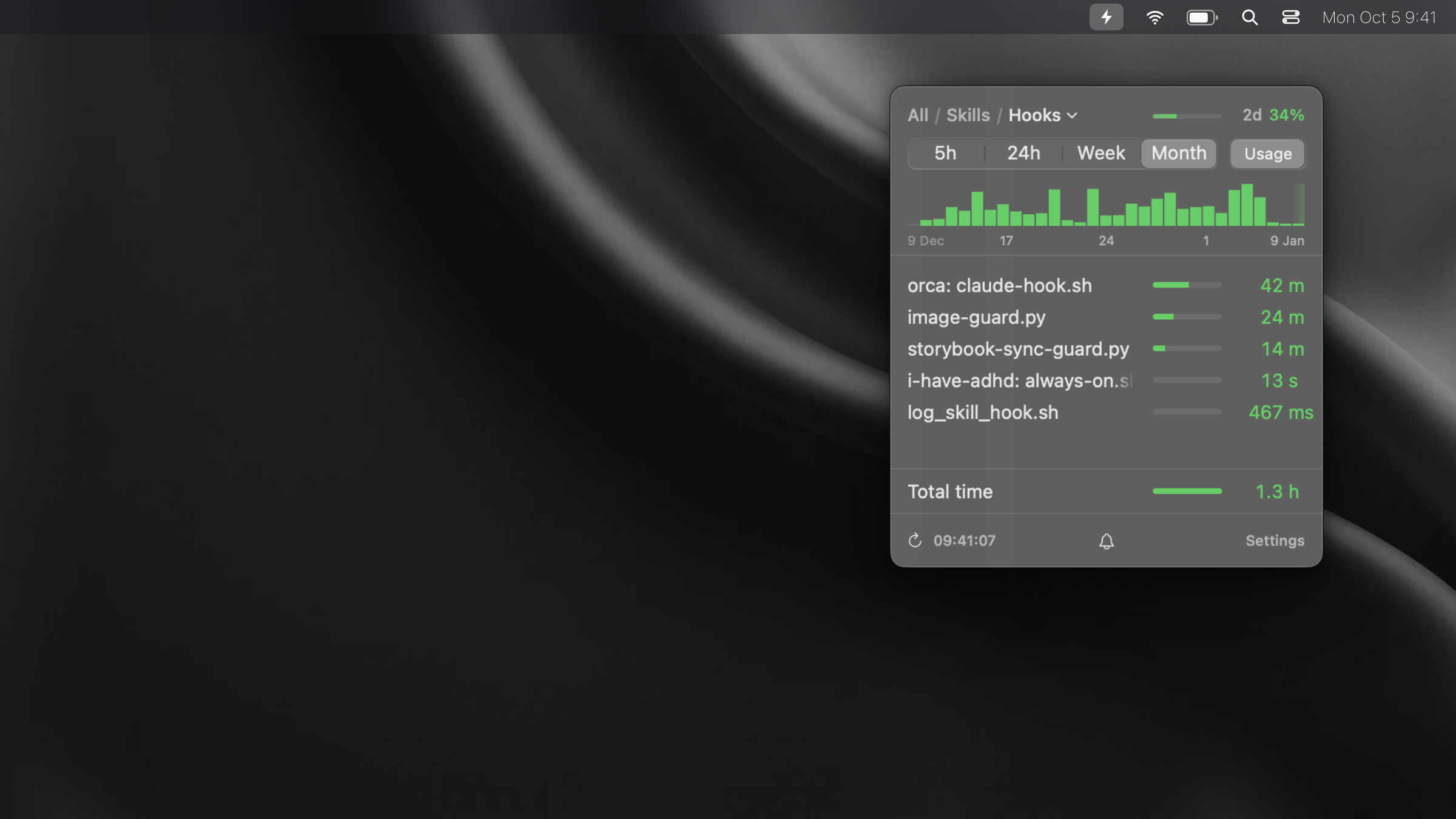
None of the above answers "which hook took the most time this week". SkillKeeper reads the same local logs and adds it up. Its Hooks tab lists each hook by script name and the plugin it came from, with how many times it ran and the total time it took over 5 hours, 24 hours, a week or a month. A pinned row shows the total time for all hooks in the period. The tab is in the macOS app and in the mod for Claude Code on Windows and Linux.
How to fix a slow hook
- Narrow the matcher. Match the tool and, where you can, the file type. A Python formatter has nothing to do on a Markdown edit.
- Run it in the background. Add
"async": trueto a command hook and Claude continues right away; the result arrives on the next turn. An async hook cannot block or approve anything, so keep checks that must stop a tool call synchronous. - Move heavy work to Stop. Run tests and type checks once when Claude finishes, on
Stop, not after every edit. - Set a short timeout. A guard that normally takes 200 ms can have
"timeout": 5. A timed-out hook is cancelled and its decision dropped, so it fails open. - Skip the start-up cost. Call an installed binary instead of
npx, or keep the logic in one script instead of several. - Measure again. Compare the hook's total time for the next week with the week before.
Frequently asked questions
Do Claude Code hooks block Claude?
Yes, by default. Claude waits until every matching hook finishes or times out. Command hooks can run in the background with "async": true, at the cost of not being able to block or change the action.
What is the default hook timeout in Claude Code?
600 seconds for command, HTTP and MCP tool hooks, 30 seconds for prompt hooks and 60 seconds for agent hooks. UserPromptSubmit hooks get 30 seconds. Set your own per hook with "timeout" in seconds.
Do hooks run one after another?
No. All hooks that match an event run in parallel. If two PreToolUse hooks both change the tool input, the one that finishes last wins.
Do hooks run for subagents?
Yes. Tool hooks fire for tool calls inside subagents too, so a slow PostToolUse hook slows every subagent that edits files.
How do I find which hook is slow?
For one session, run claude --debug and read the hook lines in the log. To compare hooks across sessions and days, total each hook's run time, by hand from the logs or with a tool like SkillKeeper.
Related
- How much context CLAUDE.md and memory files take – the other thing that rides along on every request
- Why Claude Code burns through tokens – the usual causes and how to find yours